Other version: Chinese workbook
Codex Intro Workshop Workbook
A 30-minute guide for business and operations teams.
| Core message | ChatGPT is useful for thinking through work. Codex is useful when you need work finished. |
|---|---|
| Main shift | Stop writing step-by-step instructions for the thing you assume should be built. Explain the business result, context, risks, and approval boundaries. |
| Practice focus | Outcome-first requests, access, feedback, unclear requests, blockers, and goals. |
Concept Checklist
By the end of the workshop, you should understand these ideas and be able to use the prompt patterns in this workbook.
- Codex is most useful when you ask it to deliver a result, not just answer a question.
- Plugins, internal tools, and computer use let Codex take action inside the tools where work happens.
- A good request explains the business result, user context, risks, and approval boundaries.
- You do not need a perfect prompt. A useful first result is enough; improve it through feedback.
- Good feedback explains what is wrong, why it matters, and what outcome Codex should move toward.
- When the solution is unclear, Codex can ask a small number of important questions first.
- When Codex falls short, do not clean up manually too early. Identify what is missing and push it forward.
- Use
/goalfor longer jobs that may require follow-up.
1. Advice vs Finished Work
Codex is different because you can ask it to finish the job, not just explain the situation.
| ChatGPT-style request | Codex-style request |
|---|---|
Here is Livatro 7001 sales data. Why did sales drop? This may explain the data you gave it, but you still need to decide what else to check, update the spreadsheet, and prepare the team message. |
Finish the Livatro 7001 sales-drop analysis.
Figure out what needs checking, gather what you can,
put the result in a spreadsheet, and prepare the team message.
Ask me only if you hit a real blocker or need approval.
This gives Codex the result to deliver and tells it when to come back to you. |
2. Why Codex Can Finish Work
The difference is not simply that Codex has tools. ChatGPT can also read emails, browse, and connect to data. The important change is that Codex can take action in the places where work happens.
| Plugins and internal tools | Computer use |
|---|---|
|
|
Video file: codex-workshop-video.mp4
Video file: computeruse-2x.mp4
3. Ask For The Business Result
The main working habit is to explain the actual business result before naming the tool you think Codex should build.
| Bad | Better | Best |
|---|---|---|
Build a dashboard that can answer questions X, Y, and Z,
and make it look like this other dashboard.
This over-controls the solution. |
Build a dashboard that can answer questions X, Y, and Z. This names the likely tool, but still assumes a dashboard is the right answer. |
I need a tool, possibly a dashboard, that helps me answer questions like X, Y, and Z quickly and accurately.

The main person asking is usually Carson. He tends to challenge the worst-performing indicators, even when overall performance is good.

This tool should help me quickly find the weak spots, check whether they are real problems, and prepare a clear response to his challenges.
This explains the real job, user, pressure, and success criteria. |
The better habit is to give Codex the goal, context, risks, and approval boundaries. Let it decide the path.
4. Start Small, Then Give Feedback
The backpack example shows why feedback beats trying to plan everything upfront.
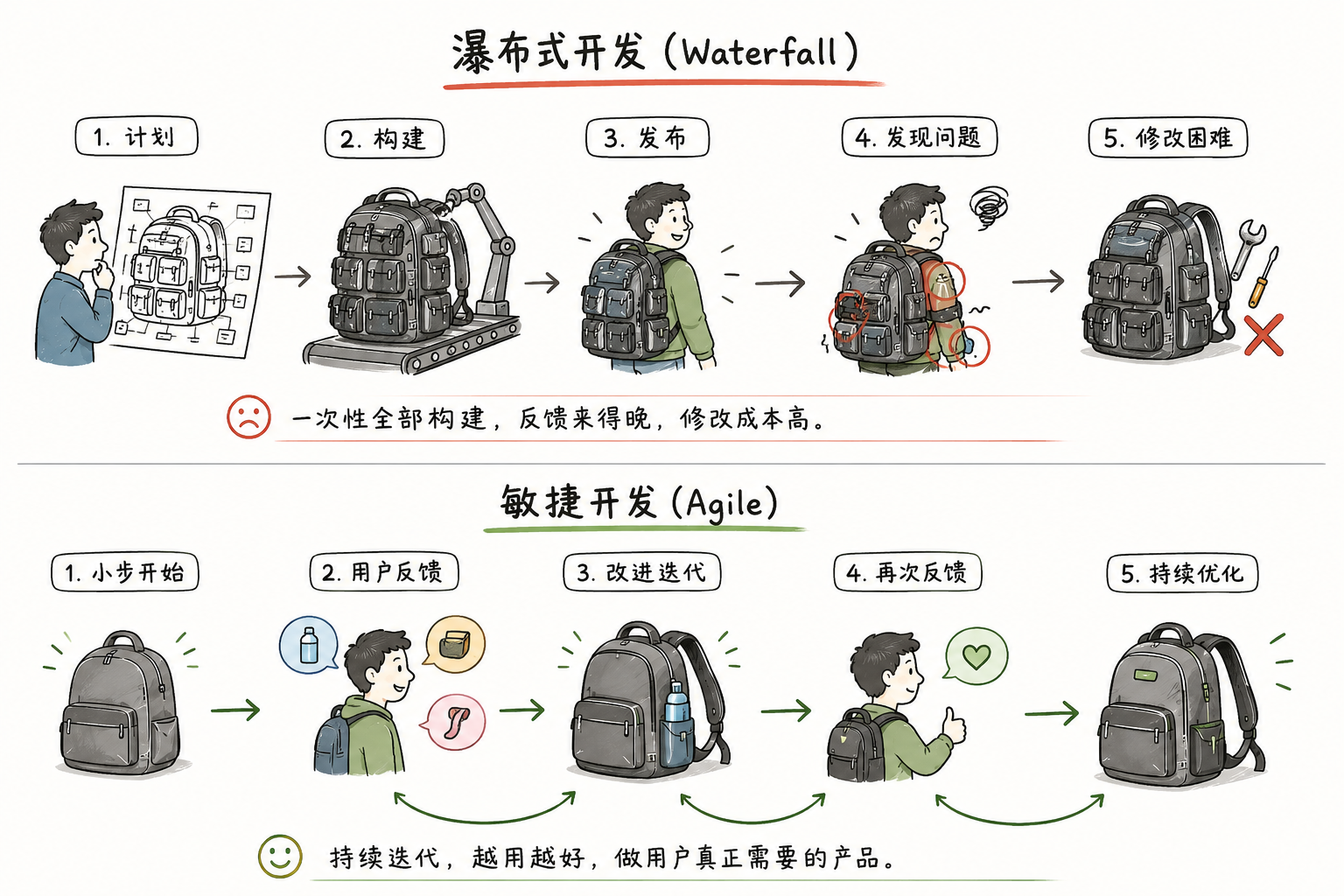
| All-upfront planning | Codex working style |
|---|---|
|
|
Good feedback criticizes both the result and the decision behind it. Do not just hand Codex the right answer with no context. A person learns better when you explain why something was wrong and guide them toward the right answer. Codex works the same way.
| Weak feedback | Better feedback |
|---|---|
You should do X. |
This result is subpar because you chose Y. If we do Y, we will have this problem. Please revise toward [desired outcome]. If you think your choice is still right, explain why. |
5. If You Are Unsure, Make Codex Ask
Sometimes you know the pain, but not the solution. Do not force a fake clear request.
I have a problem/painpoint, but I am not sure what solution we need.
[Describe problem or painpoint]
Ask up to 5 most important questions.
Only ask questions that would change the final result.
Then recommend what we should do.
6. Do Not Worry About Setup
Setup means the prompts, plugins, internal tools, skills, and access Codex needs. Business users do not need to manage this directly.
Focus on the result. If Codex needs something, it will usually say so. If someone else’s Codex can do something yours cannot, ask the CyberFlo team. It is often a simple fix: add a plugin, connect an internal tool, enable computer use, or pass along an instruction.
7. When Codex Falls Short
Do not take the work back too early. Find what is blocking the work and push it forward.
This is incomplete.
Do not make me finish it manually.
Tell me what is missing: goal, information, access, permission, or checking.
Then keep going as far as you safely can.
Being a good Codex user is similar to being a good manager: give useful feedback, remove blockers, and push the work back to Codex.
8. Bonus: /goal
Normal Codex can already finish many basic jobs. Use /goal for longer jobs that may need follow-up.
Basic jobs
Read this Feishu Mail thread, write the reply, ask before sending, then send it after approval.
Finish this Snowflake-backed analysis, put it in Excel, and prepare a Feishu message to Y.
Open this CyberFlo page, try the workflow, and prepare the improvement brief.
Ecommerce example
/goal Resolve this customer's replacement issue.
Use Feishu Mail and CyberFlo if needed.
Write the reply draft in Feishu Mail.
Ask before sending.
After I approve, send it.
If the customer replies, continue until resolved or blocked by my decision.
Handout Prompts
Ask for a result
I need to accomplish [result].
The problem is [pain].
Figure out the best way to help.
Ask me only if something important is missing.
Give better feedback
This result is subpar because [decision or assumption].
If we do it this way, [problem].
Please revise toward [desired outcome].
If you think your choice is right, explain why.
Make Codex fix it
This is wrong or messy.
Do not make me clean it up by hand.
Explain what went wrong if needed, then fix it.
Make Codex ask
I have a problem/painpoint, but I am not sure what solution we need.
[Describe problem or painpoint]
Ask up to 5 most important questions.
Only ask questions that would change the final result.
Then recommend what we should do.